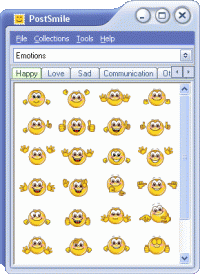
Make your messages brilliant and very special! Use PostSmile to place smiley faces and animated emoticons, pictures and photos, famous quotes and personal handwritten signatures into your email letters, web-forum and message board postings.
Do you want to make your emails more interesting, fun or get your message stand out from the others. PostSmile makes it easy to add fun to your email!
Use PostSmile to place Smiley Faces and Animated Emoticons, Photos and Pictures, Text Snippets and HTML code, Famous Quotes and Personal Signatures into your Email Letters, Web Forum and Message Board Postings.
This is very easy! Just Drag and Drop an image from PostSmile into Your Message. That's all with it!
The program offers a wide variety of original artist-created pictures that are sure to leave no one indifferent. But, you don't have to stop there! You can add into PostSmile your own smileys, pictures and photos, or collect smileys and pictures from other Internet web-sites.
You can drag images from Internet web-sites or from your hard drive and drop them into PostSmile!
Our artists have created for you hundreds and hundreds of great emoticons. There are more than 3700 premium Smiles in PostSmile Premium Extras. And we publish new creations regularly.
With PostSmile you also can create your Personal Handwritten Signature and then use it at the bottom of your email.
PostSmile can also be very useful as a tool when using the Text/HTML signature feature. You can use it to save special signatures for adding text you often include in your email. You can use famous sayings, for example, as PostSmile signature files and include them at the bottom of your email. You can combine images and text and make your own original signature!
If you want to say more - say it with PostSmile! Make your messages brilliant!
Requirements:
• MS Internet Explorer 5.0+
Operating system:Windows 2K / XP / 2003 / Vista / 7
Limitations:Does not contain Premium Smileys
Release notes:Minor Update

ImTOO 3GP Video Converter v3.1 is a professional mobile phone tool. It supports converting
various popular formats including RM, RA, 3GP, 3G2, WAV, MP3, AAC, WMA, MPG, M4A, AVI,
MP4, MOV, WMV, MPEG, CUE, APE, CDA and AVI to 3GP,RA, RM,AAC, M4A,XviD.
Price: $25.46, Rating: 8.2, Downloads: 107
Download

Total Audio Converter is the best tool to convert mp3, wav, flac, ogg, ape and much more. Look closer at it: TAC supports all audio formats, has built-in CD ripper and audio player, can be handled via command line and is still very user-friendly.
Price: $17.91, Rating: 6, Downloads: 100
Download

Reezaa WMA Converter is an easy-to-use all to WMA converter Converts all formats Video and Audio to WMA,WAV,MP3,OGG,FLAC,AMR,AC3,AAC.It supports MP3, AVI, WMV, MOV, 3GP, MP4, FLV, RM, RMVB, VOB, DAT, MPEG, WAV, WMA, ASF, OGG, RA etc.
Price: $29.95, Rating: 0, Downloads: 93
Download

Ultra QuickTime Converter is a powerful tool to help you convert QuickTime MOV, QT, MP4, M4V files to AVI, DivX, Xvid, MPEG1, MPEG2, WMV, VCD, SVCD, DVD, MP4, 3GP, FLV formats.
Price: $29.00, Rating: 10, Downloads: 73
Download
Jesterware DVD Audio Ripper is a powerful DVD Audio ripping program, which will take your DVD and convert the audio track into an audio formats of your choice.
Price: $24.99, Rating: 6, Downloads: 69
Download 
 PostSmile 7.0.5